Statuses are probably the most important attribute of noCRM to help your team manage their sales process smoothly.
This article explains the 5 lead statuses, how to set reminders for your next actions and how to edit the creation and Won dates of your leads.
noCRM has 5 statuses:
2 alive statuses: To do and Standby.
3 closed statuses: Won, Cancelled and Lost.
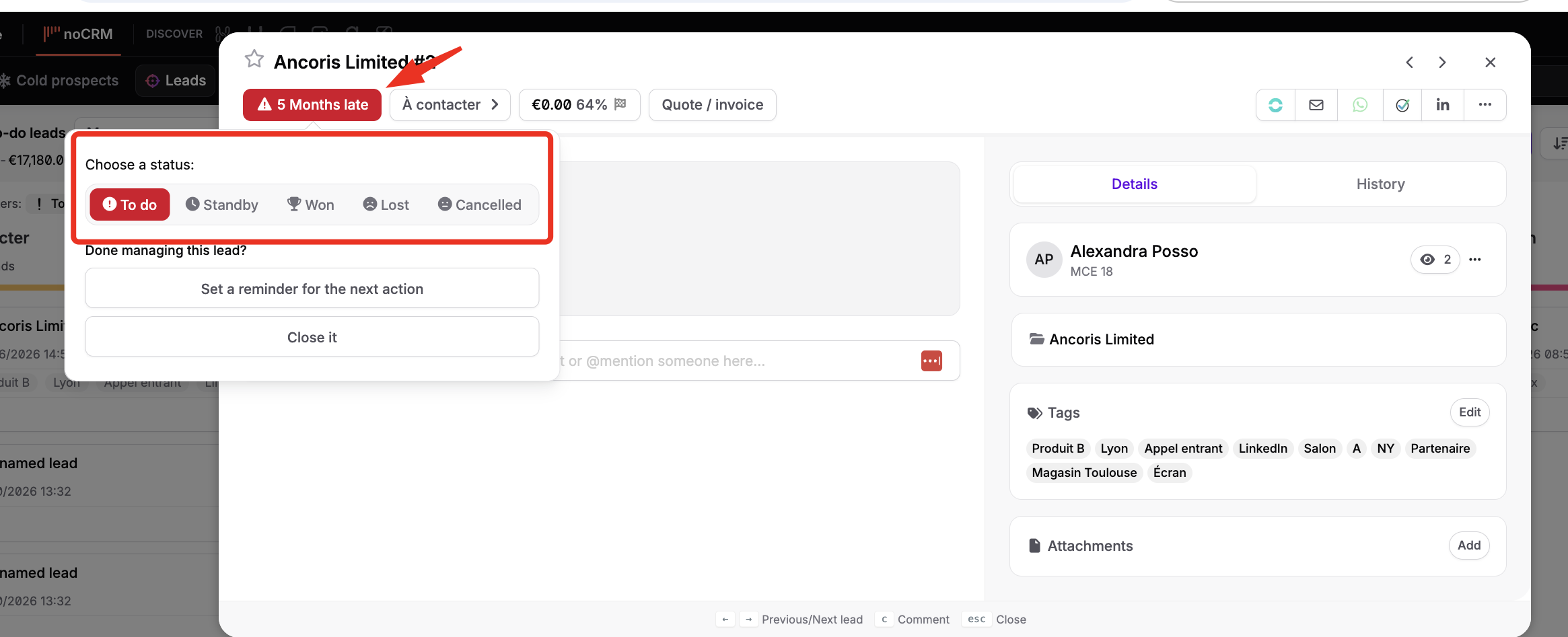
Until a lead is closed, either you have something to do right now (To do) or you will have something to do at some point (Standby).
A lead on Standby always has a reminder for a next action. When the time of the reminder comes, the status of the lead changes back to To do and you find it at the top of your To do section.

Follow these steps:
Open the lead.
Click the colored status button of the lead, or use the Actions menu or a keyboard shortcut.
Select the new status.
If you select Standby, choose a date for the reminder.
If you specify a time for the reminder, it is synchronized with your calendar. If you specify a duration, the reminder shows its exact duration, so you don't schedule another call at the same time.

The lead stays in To do and a counter starts, showing that you are overdue on this lead. Manual actions on the lead, such as changing its step, adding a comment, sending an email or logging an activity, automatically reset the counter: the lead is categorized as To do again, without the pressure of an increasing counter.
To deactivate this automatic counter reset, follow these steps:
Click your avatar at the top right.
Go to Admin panel > Account management > Preferences.
Uncheck Automatically reset the delay to 0 days when manually logging an activity or changing the step of a to-do lead.
For further details about the 3 closed statuses, read this article in our Sales Academy. Won is quite explicit, but Cancelled and Lost don't mean the same thing:
Lost means you lost against the competition.
Cancelled means you did not reach your goal for any other reason.
You can also tag the lead with the reason why you didn't close the deal, thanks to the tags on closing feature.
When a lead is moved to Won, noCRM celebrates the achievement by showering the workspace with confetti: a simple yet powerful way to motivate your team. To enable or disable this feature, follow these steps:
Click your avatar at the top right.
Go to Admin panel > Account management > Preferences.
Check or uncheck Celebrate won leads with confetti.
When you start with noCRM, you will probably need to import existing data. For your statistics to be correct, edit the creation date of your leads if necessary.
To edit the creation date, open the lead and click the Edit button next to the creation date.
You can also edit the Won date of a lead, as long as the lead was created before the date you won it. Follow these steps:
Open the lead.
In History since creation, in the right sidebar, click the blue pencil icon next to the Won date.
Select the new date.

Here is a quick video showing how it's done: