Prospecting lists are used for cold prospecting or to import contacts. Each row is a prospect that hasn't been qualified yet. You can create and edit a prospecting list directly in your noCRM account, in the Cold prospects section, to handle the first phase of your sales process.
Once a prospect becomes a real opportunity, turn it into a lead to move it through the steps of your sales process.
Follow these steps:
Open your prospecting list in the Cold prospects section.
Click the + button at the beginning of the prospect's row.
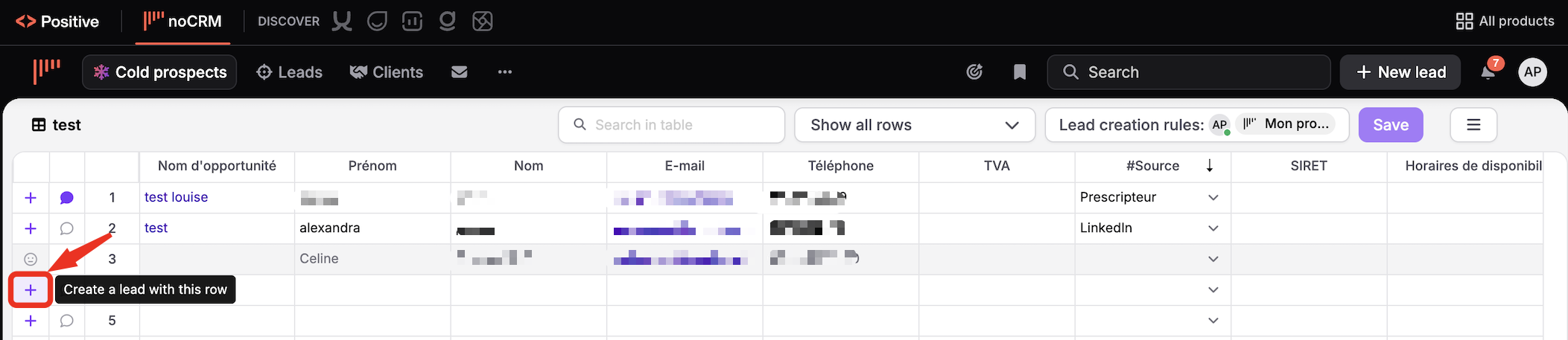
The new lead is created in your pipeline. The row of the prospecting list is then frozen: only the lead can be edited, and its changes aren't copied to the row. To get an up-to-date database, export your leads.

When a lead is won, it moves to the Clients tab and no longer appears in the pipeline or in the list of leads.
If you create a lead by mistake and want to reactivate the prospect, simply delete the lead: the row becomes active again in your prospecting list.

A configuration wizard helps you import your spreadsheet properly. Watch the tutorial (from 2:27):

