Do you have a sales team and wish to reproduce your sales structure in your lead management software? It's possible.
The 'teams' feature allows you to create subgroups inside noCRM. It is especially useful for companies that don’t need direct interaction between teams but do need data consolidation as well as global activity reports.

Inside teams, you can choose who can access information:
Click your avatar at the top right.
Go to Admin panel > Roles and privacy settings.
The options are:
Only admins can see everything inside teams
Only team managers can see everything inside teams
Everything is shared between members of the same team
To optimize your teams' management, you can also decide between admins, team managers, or simple users, as to who can assign or reassign leads inside a team.
Once the feature is activated, follow these steps to create your first team:
Click your avatar at the top right.
Go to Admin panel > Account management > Teams.
Click New Team.
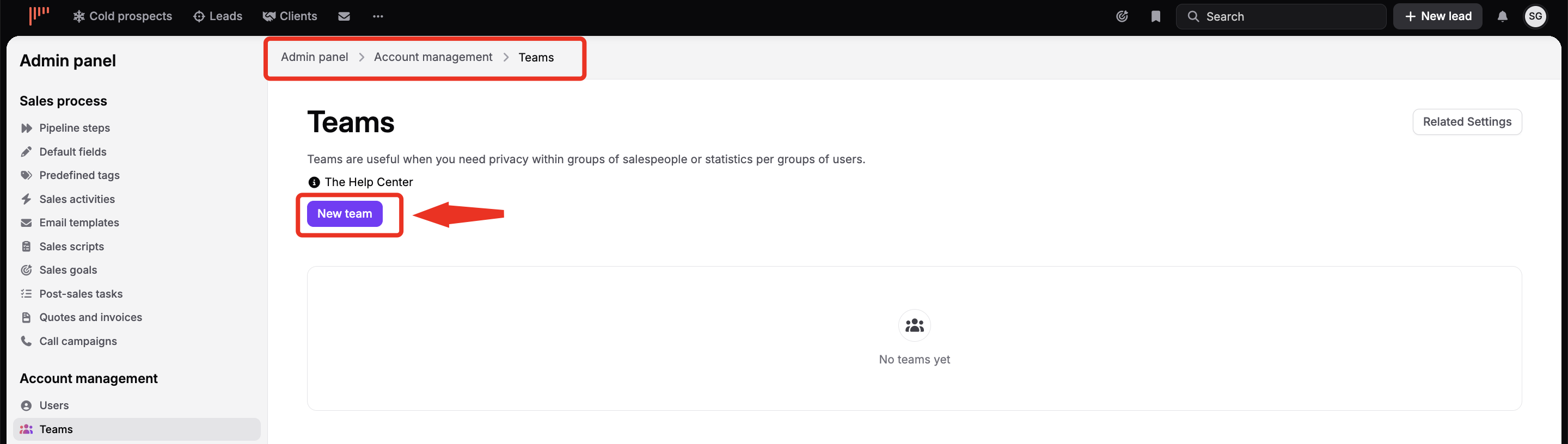
Once a team is created you can assign users to it and choose them as team managers. Depending on the privacy setting you have chosen, team managers may access and edit other users’ leads and access their statistics.

Once the team feature is activated, you'll be able to filter your statistics By team, allowing you to see the statistics of a specific team and group the data by day or by members of the team.
Also, if you are team manager of several teams, you can access consolidated statistics of all teams and per team.

