Amount and probability are very important for forecasting and sorting your leads. They can be the key to a good sales strategy.
You can set them on each lead, and you can also define default probabilities for the different steps of your pipelines.
Follow these steps:
Open the lead.
Click the Set amount button.
Enter the amount and the probability.
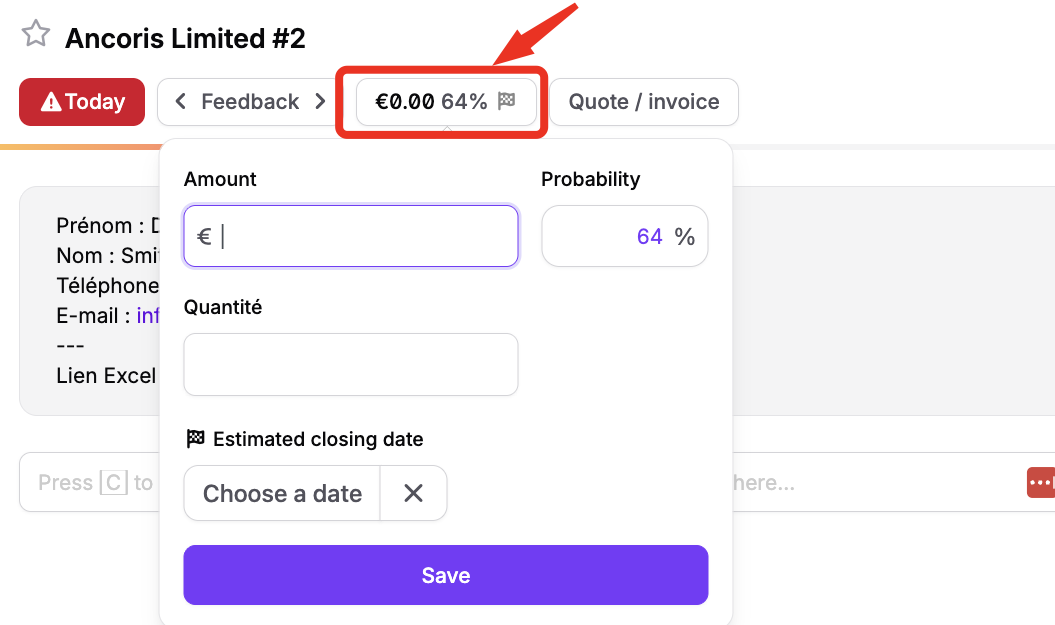
Once an amount is set, click it again to change it. You can also fill in the Amount and Probability (%) fields when you create a lead with + New lead.

Having a clear sales forecast is key to a good sales strategy. Every sales director needs to know how many leads are in the pipeline, when they are expected to close, the total amount they potentially represent and their weighted value. With good forecasting tools, companies have the right data to make informed decisions and predict their sales performance.
That's why you can define a default probability for each step of your sales pipeline. When creating your pipeline steps, an option to define the probability of every step shows up.
Example: "Called" = 20% / "Negotiation" = 80%.
If you were already using noCRM, simply edit each step to define its default probability. Based on the history of your leads, noCRM suggests a percentage for each step.